Most SaaS products have a gap between signup and the moment users actually get it. For WPFeatureLoop, that gap was brutal.
Users would create an account, look at the dashboard, and then… nothing. The next step was installing an SDK via Composer. For a WordPress developer who just wanted to see if the tool was worth their time, that’s a big ask.
We had a 72% drop-off between account creation and first SDK install. Most of those users never came back.
So I fixed the onboarding. And the fix came from an unexpected place: WordPress Playground.
The Problem With “Install First” Onboarding
WPFeatureLoop is a feature voting SaaS for WordPress plugin owners. You install a PHP SDK into your plugin, and your users get an embedded widget where they can suggest features, vote, and comment. You manage everything from a Kanban dashboard.
The value proposition is clear once you see it working. The problem was that users couldn’t see it working without first integrating the SDK, which means setting up Composer, adding a dependency, configuring keys, and deploying. That’s 20–40 minutes of work before you can answer the question “is this worth it?”
This is the classic activation problem: you’re asking users to invest before they’ve seen the return.
The metric that made this concrete: our activation rate, the percentage of signups who completed the SDK integration and submitted at least one feature request, was sitting at 72%. Everything else downstream (retention, upgrades) was handicapped by that number.
The Fix: Let Them Try It First
The insight was simple. Instead of asking users to install the SDK to see the widget, what if I could show them the widget first with zero setup?
That’s where WordPress Playground comes in.
WordPress Playground is a full WordPress environment that runs entirely in the browser, powered by WebAssembly. No server. No install. Just a real WordPress site running locally in a tab.
And crucially, it supports Blueprints, a JSON configuration format that lets you define exactly what happens when the Playground loads: which plugins to install, what settings to configure, which page to open, even which user to log in as.
This meant I could build a Playground environment that:
1. Automatically installs a demo plugin with the WPFeatureLoop SDK already embedded
2. Pre-configures it with the user’s actual project API keys
3. Opens directly on the page where the widget lives
4. Logs them in as admin automatically
The user clicks “Try it live”, a new tab opens, and in seconds they’re looking at the real WPFeatureLoop widget, running against their real project.
How It Works Technically
The Blueprint is generated server-side at the moment the user clicks “Try it live”, with their project keys injected dynamically. Here’s a simplified version of the structure:
{
    "landingPage": "/sample-page/",
    "login": true,
    "plugins": ["wpfeatureloop-demo"],
    "steps": [
        {
            "step": "defineWpConfigConsts",
            "consts": {
                "WPFL_PROJECT_KEY": "their-actual-key",
                "WPFL_API_URL": "https://api.wpfeatureloop.com"
            }
        }
    ]
}
The Playground URL is then:
https://playground.wordpress.net/?blueprint-url=https://app.wpfeatureloop.com/api/blueprint/{project_id}That’s it. The user lands on a working widget connected to their dashboard. They can submit a feature request, vote on it, and then switch back to the WPFeatureLoop dashboard and see it appear in real time.
One important caveat: the Playground sandbox is temporary and doesn’t persist data between sessions. But that’s fine for onboarding, the goal is to demonstrate value, not to store data.
The UI Change
In the dashboard, when a user creates a new project, a “Get Started” modal opens with three tabs:
– Try it live (default, highlighted): the Playground flow described above
– Install SDK: the traditional Composer setup instructions
– See in action: an embedded video demo
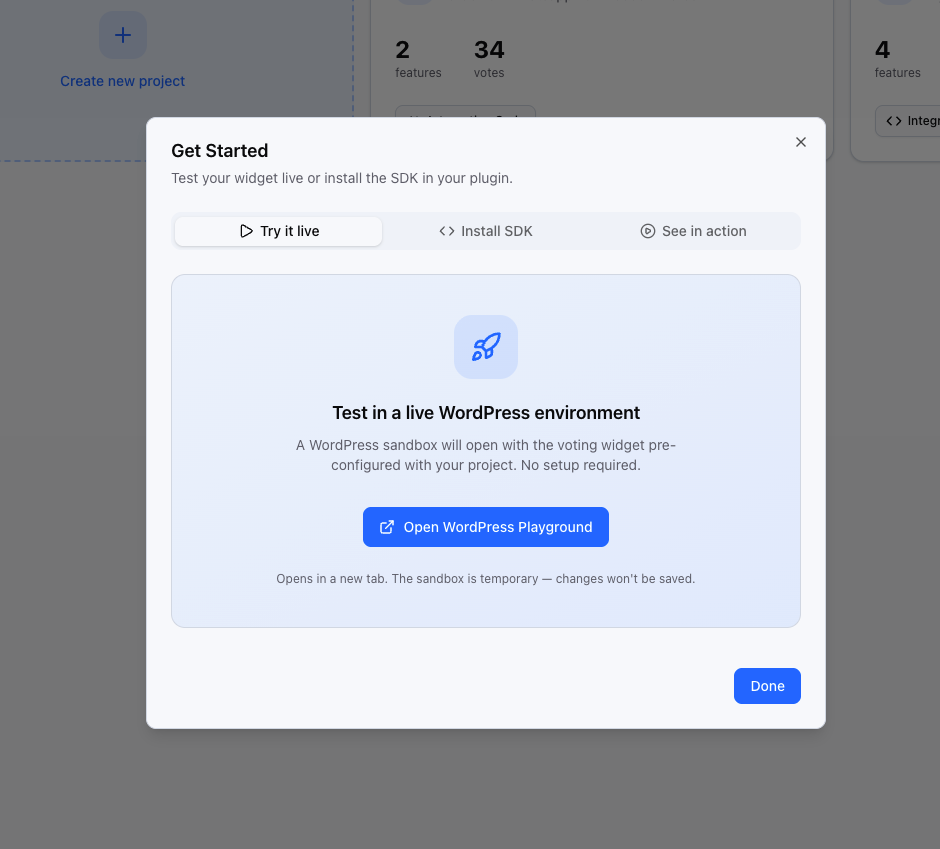
Making “Try it live” the default tab was a deliberate choice. Most users will click whatever is already selected. By making the zero-friction path the default, you remove the decision entirely for the majority of users.
The Results
After shipping this, activation rate went from 28% to 51%, a 80% improvement.
The metric I care most about is the percentage of new signups who complete a meaningful action within the first session. That number moved significantly, and the change is almost entirely attributable to users who previously would have bounced at the “install SDK” step.
A few things I noticed:
– Users who went through the Playground flow first were more likely to complete the SDK integration afterward. Seeing the end result first gave them a reason to do the work.
– Support questions about SDK setup dropped: users arrived at the install step with a clearer mental model of what they were building toward.
– The “Try it live” tab gets clicked on 92% of project creations.
Why More SaaS Products Should Do This
The pattern here isn’t specific to WordPress. The core idea is: don’t make users imagine the value, show them the value first.
WordPress Playground made this unusually easy for a WordPress-based product, but the same principle applies anywhere you can create a sandbox environment. The question worth asking for any SaaS onboarding is: what’s the minimum viable experience that makes the user feel the product working?
For WPFeatureLoop, the answer was a working widget in a browser tab. Everything before that, the signup, the project creation, the key configuration, is setup, not value. WordPress Playground let me compress all of that setup to zero for the user’s first experience.
If you’re building a WordPress product and haven’t looked at Playground Blueprints yet, it’s worth an afternoon. The documentation is solid and the API is straightforward.
WPFeatureLoop is a feature voting platform for WordPress plugin owners. If you’re building a plugin and want to know what your users actually want, give it a try.